Domo: a calendar agent you text
Domo is a native Claude Code agent that manages your calendar. You text it at a real number. It runs on your Claude subscription — no API key needed. Hand this page to a coding agent and follow along.
Step 1: What you need
- A machine that stays on: macOS or Linux; a home server, a spare laptop, or a Raspberry Pi with a screen (see Pick your host, below).
- A Claude subscription account — Domo’s session runs on it, and the Google Calendar connector (Step 2) needs the claude.ai sign-in.
- iMessage or SMS — Domo gets its own number through Plow Chat; you text one activation code from any iMessage client or phone in Step 3.
- The CLI utilities Domo uses: Bun, Claude Code,
tmux(keeps Domo running after you detach),curl(the Plow Chat steps), andjq1.6 or newer (writes the screen’s agenda every half hour).
Make the domo folder and work inside it: every command and file on this page lives there. This page writes it as ~/domo; put it elsewhere and substitute your path throughout. Each file below is printed in full as a named block, and the copy button gives you the clean file.
Pick your host now. Everything from Step 2 on happens on the machine Domo lives on. A Raspberry Pi with a screen makes the nicest home: steps 1–2 of Install Hermes on a Raspberry Pi get a Pi on your network and reachable over SSH (ignore the Hermes parts), and this whole page runs on the Pi the same as anywhere else.
Step 2: Sign in + connect your calendar
YOURSRun claude in a terminal on the host and answer its first-run questions. When it asks how to sign in, your Claude account subscription works: Domo runs on the plan you already pay for, nothing here needs per-token billing. Once you’re signed in, type /quit, then confirm:
$ claude   # sign in, then /quit
$ claude auth status --json
{ "loggedIn": true, ... }
Connect the calendar too: in a browser, sign in to claude.ai with the same account, open Settings → Connectors, and connect Google Calendar. Domo reads and writes your calendar through that connector, and anyone who can text Domo can read and change every calendar the connected account sees. Your first text to Domo (Step 6) is the proof it works.
claude and to connect Google Calendar on claude.ai, then wait. When they say they’re done, run the auth status check above and continue with Step 3.Step 3: Get its phone number
YOURSDomo’s phone number comes from Plow Chat, and the Plow Chat API guide covers the whole flow. An individual thread (the guide’s Steps 2 to 4) and a group thread both work: Domo never sees the difference, it only needs the two values either path ends with, the Bearer token and the chat uid. Save them as plow.json in the domo folder. The bridge reads exactly this shape:
{
  "token": "<the Bearer token from activation redeem>",
  "chat_uid": "<the chat uid, cht_...>"
}
Anyone on the thread can text Domo, and anyone who texts Domo can read and change your calendar events. Choose who is on it.
plow.json holds the real values.Step 4: The bridge
one file, on this page in fullHere is the shape you’re building, left to right; the bridge is its first station:
The bridge is one file doing four jobs; the section banners in the code mark them.
- A WebSocket held open to Plow (
listen()): inbound texts arrive there, each becoming a channel event in the session; it reconnects itself if the link drops or goes silent. - The
replytool: the way back out, one POST to Plow per reply, and the only path that can text anyone. - A scheduler (
rhythms()): one silent refresh right after startup, then the half-hourly housekeeping event that has Domo run theagenda-syncskill (Step 5), and the morning rundown, one text about the day’s calendar at 7 each morning. - The web server behind the wall dashboard (
Bun.serve(), Step 7): nothing separate to run.
Claude Code loads the whole thing as one MCP development channel.
// plow-channel.ts — the bridge between Plow Chat and the Claude session.
// In:  Plow WebSocket -> channel notification into the session.
// Out: the `reply` tool -> one POST to Plow. Nothing else can text anyone.
// Also serves the web dashboard on 127.0.0.1:8848 while Domo runs.
import { appendFileSync } from "fs";
const DIR = import.meta.dir; // the domo folder
const st = JSON.parse(await Bun.file(`${DIR}/plow.json`).text()); // written by activation
const BASE = "https://api.plow.co";
const AUTH = { "Authorization": `Bearer ${st.token}`, "Content-Type": "application/json" };
const TZ = Intl.DateTimeFormat().resolvedOptions().timeZone;
const seen = new Set(); // dedup for this process. TODO(hardening): persist + backfill offline texts.

// Half-open WebSocket guard: Plow sends a server ping ~every 20s. If NO frame of
// any kind (data OR control ping) arrives within this window, the link is dead —
// force-close so the reconnect loop below fires. See onmessage/ping touches.
const WS_IDLE_LIMIT_MS = 60_000; // silence past this => force-close
const WS_WATCHDOG_MS   = 10_000; // how often the watchdog checks

function send(obj) { process.stdout.write(JSON.stringify(obj) + "\n"); }

function log(event) { // operational events only — never message bodies, senders, or tokens
  appendFileSync(`${DIR}/bridge.log`, `${new Date().toISOString()}  ${event}\n`);
}

// ==========================================================================
// THE CHANNEL: texts in, replies out.
// notify() delivers an event into the session; reply() is the only way back.
// ==========================================================================
function notify(content, meta = {}) { // a channel event: how a text "arrives" in the session
  const today = new Date().toLocaleString("en-US", { timeZone: TZ, dateStyle: "full" });
  const today_iso = new Date().toLocaleDateString("en-CA", { timeZone: TZ }); // YYYY-MM-DD, the refresh skill's date anchor
  send({
    jsonrpc: "2.0",
    method: "notifications/claude/channel",
    params: { content, meta: { chat_id: st.chat_uid, today, today_iso, ...meta } },
  });
}

async function reply(text) { // any 2xx from Plow is success; a thrown fetch is a failed send
  try {
    const r = await fetch(`${BASE}/v1/chats/${st.chat_uid}/messages`, {
      method: "POST",
      headers: AUTH,
      body: JSON.stringify({ body: String(text) }),
    });
    log(r.ok ? "reply sent" : `reply send failed (${r.status})`);
    return r.ok;
  } catch { log("reply send failed (network)"); return false; }
}

async function listen() { // mint a ticket, hold the WebSocket, deliver inbound texts
  while (true) {
    try {
      const t = await fetch(`${BASE}/v1/ws/ticket`, {
        method: "POST",
        headers: AUTH,
        body: JSON.stringify({ chat_id: st.chat_uid }),
      });
      const { ticket } = await t.json();
      const ws = new WebSocket(`wss://api.plow.co/v1/ws?ticket=${ticket}`);
      await new Promise((done) => {
        let lastRx = Date.now();                 // last time ANY frame arrived
        const touch = () => { lastRx = Date.now(); };
        const watchdog = setInterval(() => {     // half-open guard: silence => force-close => reconnect
          if (Date.now() - lastRx > WS_IDLE_LIMIT_MS) {
            log("websocket idle — force closing (half-open)");
            try { ws.close(); } catch {}
          }
        }, WS_WATCHDOG_MS);
        ws.onopen = () => { touch(); log("websocket connected"); };
        ws.addEventListener("ping", touch);      // Plow's ~20s server keepalive; NOT delivered to onmessage
        ws.addEventListener("pong", touch);
        ws.onmessage = (ev) => {
          touch();
          let f; try { f = JSON.parse(String(ev.data)); } catch { return; }
          if (f.type !== "message_received") return;  // messages sit INSIDE typed frames
          const m = f.message || {};
          if (m.direction === "outbound" || !m.uid || !m.body || seen.has(m.uid)) return;
          seen.add(m.uid);
          log("inbound message received");
          notify(m.body, { message_id: m.uid, user: m.sender?.display_name || "You" });
        };
        ws.onclose = () => { clearInterval(watchdog); done(); };
        ws.onerror = () => { try { ws.close(); } catch {} };
      });
    } catch {}
    log("websocket reconnecting in 5s");
    await new Promise((r) => setTimeout(r, 5000)); // TODO(hardening): backoff + TCP keepalive + offline-backfill (persist seen-set, refetch texts from the dead window)
  }
}

// ==========================================================================
// THE SCHEDULER: the first sync at startup, then Domo's two daily rhythms.
// ==========================================================================
const REFRESH = "Housekeeping — do NOT reply to the household: run the agenda-sync " +
  "skill to refresh the wall screen.";
const RUNDOWN = "Housekeeping: text the household its morning rundown — one short summary " +
  "of today's calendar, via the reply tool.";
let rundownDay = "";
function rhythms() { // channel events on a clock; nothing here waits for a text
  setTimeout(() => notify(REFRESH), 15_000);         // the first sync fires itself, once the session settles
  setInterval(() => notify(REFRESH), 30 * 60_000);   // keep the screen fresh
  setInterval(() => {                                // the morning rundown, once at 7
    const day = new Date().toLocaleDateString("en-CA", { timeZone: TZ });
    const hour = new Date().toLocaleString("en-US", { timeZone: TZ, hour: "numeric", hour12: false });
    if (Number(hour) === 7 && day !== rundownDay) { rundownDay = day; notify(RUNDOWN); }
  }, 60_000);
}

// ==========================================================================
// THE DASHBOARD HOST: one Bun server, loopback only (the wall screen, Step 7).
// ==========================================================================
Bun.serve({ // the wall screen: ui/index.html, plus the state files Domo keeps fresh
  hostname: "127.0.0.1", // loopback only; no login
  port: 8848,
  async fetch(req) {
    const path = new URL(req.url).pathname;
    const file = Bun.file(path === "/" ? `${DIR}/ui/index.html` : `${DIR}/state${path}`);
    if (await file.exists()) return new Response(file);
    return new Response("{}", { status: 404 });
  },
});
log("dashboard listening on 127.0.0.1:8848");

// ==========================================================================
// THE MCP WIRING: what makes all of the above one Claude Code channel.
// ==========================================================================
async function handle(msg) { // the MCP protocol, smallest useful subset
  const { id, method, params } = msg;

  if (method === "initialize") {
    send({
      jsonrpc: "2.0", id,
      result: {
        protocolVersion: params?.protocolVersion || "2025-06-18",
        capabilities: { tools: {}, experimental: { "claude/channel": {} } }, // what makes this a channel
        serverInfo: { name: "domo", version: "1.0.0" },
        instructions: "Anything the household should see MUST go through the reply tool.",
      },
    });
    log("mcp initialized");
    return;
  }

  if (method === "notifications/initialized") { // the session is up: start Domo's life
    listen();
    rhythms();
    return;
  }

  if (method === "tools/list") {
    send({
      jsonrpc: "2.0", id,
      result: {
        tools: [{
          name: "reply",
          description: "Send a text message to the household chat.",
          inputSchema: {
            type: "object",
            properties: { text: { type: "string" } },
            required: ["text"],
          },
        }],
      },
    });
    return;
  }

  if (method === "tools/call" && params?.name === "reply") {
    const ok = await reply(params.arguments?.text);
    send({
      jsonrpc: "2.0", id,
      result: {
        content: [{ type: "text", text: ok ? "sent" : "send failed" }],
        isError: !ok,
      },
    });
    return;
  }

  if (id !== undefined) send({ jsonrpc: "2.0", id, result: {} }); // politely ack anything else
}

for await (const line of console) {  // MCP over stdio: one JSON-RPC message per line
  if (line.trim()) { try { handle(JSON.parse(line)); } catch {} }
}
Tell Claude Code about the bridge. The name is just a label; this guide uses domo, and what matters is that three places say the same word: the name you register here, the server:domo flag in run.sh (Step 6), and the uninstall’s mcp remove (Step 9). Run this from inside the folder, so $PWD fills in the file’s absolute path:
$ claude mcp add domo --scope local -- bun "$PWD/plow-channel.ts"
The ✔ Connected it prints only means Claude Code can start the file; the connection to Plow itself opens when the session starts, in Step 6. Checking the bridge means running it, and you can do that yourself, right now. A healthy bridge is silent in the terminal (it writes to bridge.log), so the log is where to look:
$ bun plow-channel.ts &   # run it in the background (or use a second terminal)
$ tail bridge.log         # "dashboard listening on 127.0.0.1:8848" = alive
$ kill %1                 # stop the manual run; Step 6 starts it for real
Two failed-check cases that don’t mean a broken install:
- Before Step 3 is done: the bridge’s first lines read
plow.json(look at the top of the file above) and it exits without that file, so the check shows✘ Failed to connectuntil Step 3’s file is in the folder. - While something holds port
8848: the bridge always binds127.0.0.1:8848for the dashboard, so the check fails while anything else has that port. Usual suspects: an already-running Domo, orclaude mcp listitself, which health-checks by launching the bridge and briefly holds the port. A manualbun plow-channel.tsright after it fails withEADDRINUSE; wait a beat and rerun.
TODO(hardening) markers show what’s left to you: reconnect backoff, TCP keepalive, and persisting the dedup set so texts sent while Domo is down get backfilled. Run it first; harden later.TODO(hardening) markers stay unimplemented. If the reader wants those extras once Domo answers texts, treat them as a follow-up task, not part of this install.Step 5: Teach Domo its job
Now teach Domo its job. Start with CLAUDE.md, which Claude Code reads automatically from the folder it runs in: what Domo is, where replies go, and what it must never touch. Then add the skill that keeps the screen fresh.
CLAUDE.md
# Domo
You are Domo, a warm household calendar assistant, reached by text message.

- Anything the household should see goes through the domo `reply` tool, as
  short plain text. Ordinary assistant text reaches no one.
- The calendar is the Google Calendar connector's tools. Read it before answering;
  create and change events when asked.
- Check every calendar you have access to: on any calendar question, include events
  from all calendars unless the user names a specific one — "what's going on
  tomorrow?" means every calendar, not just one.
- The wall screen's agenda is not yours to write — the agenda-sync skill owns it.
  Run that skill after you create, change, or delete events, and whenever a
  housekeeping event or a person asks for a refresh. Never write state/agenda.json.
- The screen also reads state/countdown.json {"date","label"} and state/location.json
  {"lat","lon","label"}, in this folder. The weather and countdown cards start blank:
  write state/location.json when someone texts a place ("set my weather to Oakland") and
  state/countdown.json when they name an event worth counting down to — and offer to set
  them if they haven't.
- "Housekeeping" channel events come from the scheduler, not the household: do what
  they say, and text no one unless they say to.
The refresh crew
Next, the crew that keeps the agenda fresh: the part of Domo that runs while nobody is texting. Every half hour the bridge’s housekeeping event has Domo run the agenda-sync skill. The skill spawns calendar-fetch, a subagent pinned to Haiku (the smallest model) with only the calendar tools; it dumps the raw events to a file and runs one script. The script (jq, not a model) is what writes state/agenda.json. Domo’s main session never reads the calendar just to feed the screen, and no model retypes an event on its way to the display. Four files, at the paths in their titles.
The skill itself. It fires when the half-hourly housekeeping event asks, after any calendar edit, and when a person asks for a refresh; its whole job is one subagent spawn and one line of handling:
---
name: agenda-sync
description: Use when a housekeeping channel event asks for an agenda refresh, after
  creating, changing, or deleting calendar events, or when someone asks for the screen
  to be refreshed. Spawns the calendar-fetch subagent to rebuild the wall screen's
  agenda. Silent - never reply to the household, with one exception, a calendar auth
  failure sends a single re-login text, once per outage.
---

# agenda-sync

Refresh the wall screen's agenda. The whole job is one subagent spawn and one line of
handling — fewest possible tool calls, no narration.

1. Spawn the calendar-fetch subagent (Task tool, subagent type "calendar-fetch") with
   a one-line prompt, passing the date from the channel event's today_iso meta:

   window_start: <today_iso>

   Don't call the calendar tools yourself, and don't add anything else to the prompt.
   The subagent dumps the raw events and runs ./agenda-publish.sh itself, then
   returns exactly one line.

2. Handle that line:
   - "OK <n>" — the screen is already updated. Done.
   - "FAILED <reason>" — leave the screen alone: the last-good agenda stays up, never
     blank or rewrite state/agenda.json. Done.
   - "AUTH <reason>" — the calendar connector needs a re-login. The housekeeping
     event's "do NOT reply" describes the normal path; this alert is its single
     deliberate exception. Was the household already told? Run via Bash:
       [ -e .auth-alerted ] && echo QUIET || echo ALERT
     ALERT: send exactly one reply — "I can't see the calendar right now — it needs
     a re-login. On the machine I run on: run ./run.sh from the domo folder to
     attach, type /mcp and reconnect Google Calendar, then Ctrl-b d to detach. Text
     me if you want a hand." Only if the reply tool returned "sent", mark the outage
     announced — run via Bash: date > .auth-alerted. On "send failed", leave the
     marker absent so the next half-hour cycle retries the alert. QUIET: send
     nothing; this outage was already announced. Either way the last-good agenda
     stays on the screen. (agenda-publish.sh deletes .auth-alerted on the next good
     refresh, so each outage texts once.)

3. Beyond that one AUTH text, don't use the reply tool and write no summary — this is
   housekeeping, and nobody reads the transcript.
The subagent the skill spawns: pinned to Haiku, calendar tools only. It dumps raw events and runs the publish script. It never interprets a single event:
---
name: calendar-fetch
description: Fetch every Google calendar's raw events and publish the wall screen's
  agenda. Spawned by the agenda-sync skill. Runs on the cheapest model with a
  restricted tool set - it dumps raw tool results and runs one deterministic script,
  it never interprets calendar content.
tools: Read, Write, Bash, mcp__claude_ai_Google_Calendar__list_calendars, mcp__claude_ai_Google_Calendar__list_events
model: haiku
---

You fetch calendar events and publish the wall screen's agenda. You do NOT filter,
interpret, summarize, or reformat calendar content — the jq program inside the script
you run at the end does the normalizing. Follow these steps exactly, then return
exactly ONE line.

Your prompt gives you the window start date as `window_start: YYYY-MM-DD`. Use it
verbatim — do not compute dates yourself.

1. Call list_calendars and keep every calendar it returns.

2. For EACH calendar, call list_events for the window from window_start 00:00 through
   7 days later, in the household timezone (run.sh's TZ — your session inherits it).
   Fetch every event in the window (follow pagination if the tool indicates more
   results).

3. Assemble one JSON document — the raw tool results verbatim, nothing dropped,
   nothing reworded:
   {"calendars": [{"name": "<calendar name>", "events": [<raw events as returned>]}]}
   and Write it to raw-events.json in this folder.

4. Run via Bash: ./agenda-publish.sh
   It normalizes the dump into state/agenda.json and prints an event count; exit 0
   means the screen was updated.

5. Return exactly one line, nothing else:
   - OK <n> — agenda-publish.sh exited 0; <n> is the total raw events you dumped.
   - AUTH <short reason> — ANY calendar tool call failed with an authorization error
     ("requires re-authorization", "token expired", or similar). Do NOT write the
     dump and do NOT run agenda-publish.sh — the last-good screen must stay up.
     Return immediately.
   - FAILED <short reason> — any other failure, including any calendar's fetch
     failing. The whole cycle is FAILED — never publish a partial calendar set (it
     would silently erase that calendar's events from the screen).

The reason after AUTH or FAILED must be short and non-personal — tool or script error
wording only, never event titles, locations, or any calendar content.
The transform: raw dump in, the screen’s events shape out. It is jq, not a model, so nothing gets retyped on its way to the display:
# agenda-normalize.jq — the calendar-fetch subagent's raw dump -> the {"events": [...]}
# shape the wall screen reads. Deterministic on purpose: the subagent only dumps raw
# tool results and ./agenda-publish.sh runs this transform, so no model ever retypes
# an event on its way to the screen. Drops cancelled events and events the household
# declined. Private events show as "Busy" with no location. All-day events keep
# date-only start/end, with the end pulled back one day: Google's all-day end is
# exclusive (a one-day event arrives as end = the next day), the screen's is not.
def declined:
  ([.attendees[]? | select(.self == true and .responseStatus == "declined")] | length) > 0;
def inclusive_end:
  if . then strptime("%Y-%m-%d") | mktime - 86400 | strftime("%Y-%m-%d") else null end;

{ events:
  [ .calendars[] as $cal
    | $cal.events[]
    | select(.status != "cancelled")
    | select(declined | not)
    | ((.visibility // "default") == "private") as $private
    | { start: (.start.dateTime // .start.date),
        end: (.end.dateTime // (.end.date | inclusive_end)),
        title: (if $private then "Busy" else (.summary // "(untitled)") end),
        location: (if $private then null else (.location // null) end),
        calendar: $cal.name }
  ] | sort_by([.start, .title])
}
The screen’s one writer: it runs the transform and lands state/agenda.json atomically, then clears the auth-outage marker on every good refresh:
#!/usr/bin/env bash
# agenda-publish.sh: the screen's one writer. Normalizes the calendar-fetch
# subagent's raw dump (agenda-normalize.jq) into state/agenda.json, atomically.
# The dump holds real event data, so it is chmod 600 while it exists and always
# deleted on exit. Fixed filenames only; nothing here interpolates a path.
cd "$(dirname "$0")" || exit 1
umask 077
chmod 600 raw-events.json 2>/dev/null || true
trap 'rm -f raw-events.json state/agenda.json.tmp' EXIT
mkdir -p state
jq -f agenda-normalize.jq raw-events.json > state/agenda.json.tmp \
  || { echo "normalize failed" >&2; exit 2; }
mv state/agenda.json.tmp state/agenda.json \
  || { echo "publish failed" >&2; exit 3; }
rm -f .auth-alerted   # a good refresh ends the auth outage: next failure texts once
echo "agenda updated ($(jq '.events | length' state/agenda.json) events)"
One more file, doing two jobs. The allow rule lets the crew run unattended: Domo runs in auto permission mode, which denies a named script it can’t see into, so without this rule every refresh dies at ./agenda-publish.sh. The deny rule turns CLAUDE.md’s “never write state/agenda.json” from a request into a wall (an Edit rule covers every file-editing tool, Write included): the script stays the screen’s only writer.
{
  "permissions": {
    "allow": ["Bash(./agenda-publish.sh:*)"],
    "deny": ["Edit(state/agenda.json)"]
  }
}
If the calendar login ever expires, Domo texts you once per outage — the text says to attach and run /mcp to reconnect Google Calendar — and the screen keeps the last good agenda until then. It never goes blank.
Step 6: Run Domo, then text it
Everything Domo needs is now in one folder. Let’s make a simple launch script:
#!/usr/bin/env bash
# run.sh — start Domo, or attach to it if it's already running.
# One tmux session, two windows: 0 "claude" is Domo itself, 1 "bridge" tails
# the bridge's log. First run: creates the session and attaches you, so you
# can approve Claude's prompts. Every later run just attaches. Detach: Ctrl-b, then d.
cd "$(dirname "$0")" || exit 1

TZ="America/Los_Angeles"  # Domo's timezone. Defaults to Pacific — change it here.

DOMO="TZ=$TZ claude --permission-mode auto --dangerously-load-development-channels server:domo"

if ! tmux has-session -t domo 2>/dev/null; then
  tmux new-session -d -s domo -n claude "$DOMO; tmux kill-session -t domo"
  tmux new-window -d -t domo -n bridge "exec tail -n 100 -F '$PWD/bridge.log'"
  tmux select-window -t domo:claude
fi
tmux attach -t domo
./run.sh is the one Domo command: if Domo isn’t running it starts it and attaches you; if it is, it just attaches. Run it:
$ chmod +x run.sh agenda-publish.sh && ./run.sh
Claude opens. Approve what it asks: trusting the folder, and the development-channel confirmation for domo (press Enter on “I am using this for local development”). Expect the channel confirmation at each fresh start; you’re always there when it appears, because you started it. Then text Domo’s number from your phone:
what's on the calendar tomorrow?
Tomorrow: dentist at 9, school pickup at 3. Want a countdown for anything?
The session has two windows. Ctrl-b 0 is Claude — Domo itself. Ctrl-b 1 tails bridge.log, which the bridge writes in the folder: watch inbound message received and reply sent scroll past as you text. It’s an observability tab, nothing more — the bridge still runs as Claude’s one MCP subprocess.
Now press Ctrl-b, then d to detach, and Domo keeps running without the terminal. From here ./run.sh is all you ever type: while Domo runs it attaches you to check in; after a reboot (or a crash) it starts Domo fresh, and you approve again. You start Domo by hand, every time. That’s the design, not a workaround.
Last move in this step: confirm the first refresh ran. You don’t fire it; the bridge does, about fifteen seconds after startup, so the screen (Step 7) has events the first time anyone looks at it. (Want one on demand later? Text Domo refresh the screen; the same words work any time.) Confirm on the host:
$ jq '.events | length' state/agenda.json   # a number within ~a minute of starting = the crew ran
7
jq '.events | length' state/agenda.json until it prints a number: allow about a minute, and the file may not exist on the first poll. If nothing appears, ask the reader to text Domo “refresh the screen” (the manual retrigger), and ./run.sh attaches to the live session to read what happened../run.sh and approve, then wait for their reply text to arrive. If no reply comes, ./run.sh attaches to the live session: no domo channel usually means the mcp add name and the launch flag’s server:domo don’t match.Step 7: The screen
The server side already exists: while Domo runs, the bridge serves ui/index.html and the state files at http://127.0.0.1:8848. All that’s missing is the page itself; you (or your agent) build it from the pictures below.
This is the screen to build:
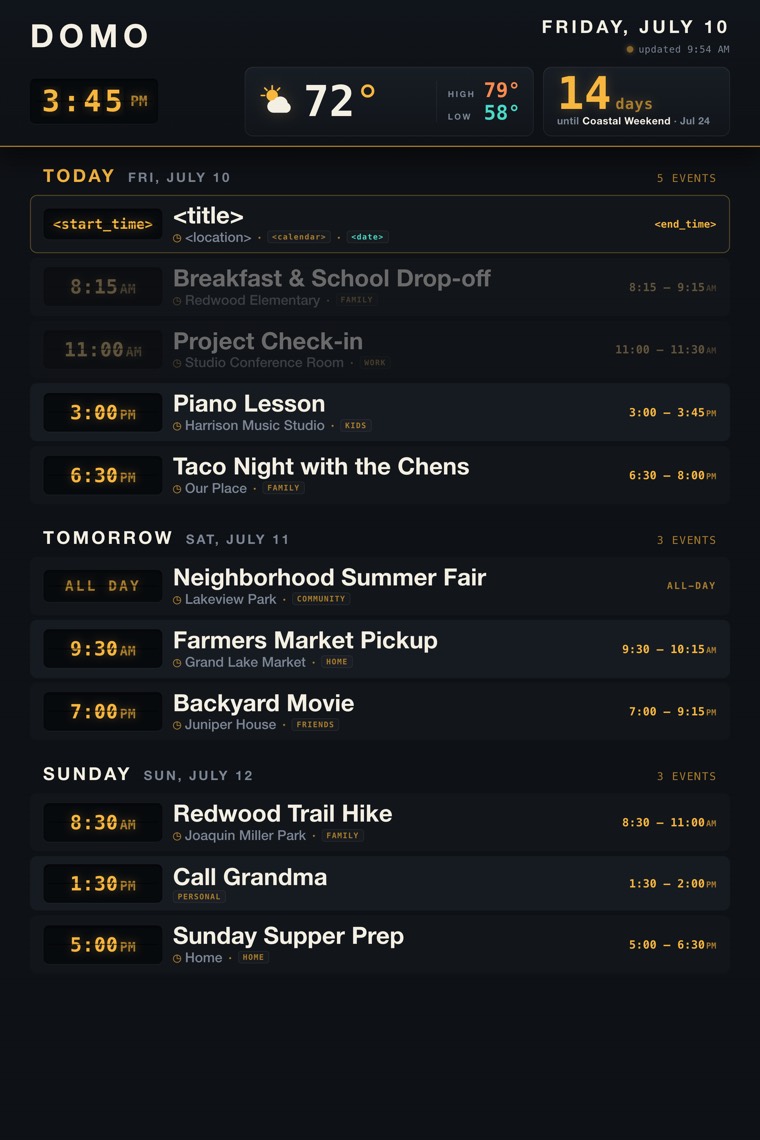
<start_time>, <title>, <location>, <calendar>, <date>, <end_time>. The live dashboard renders real events only; the other rows are example data.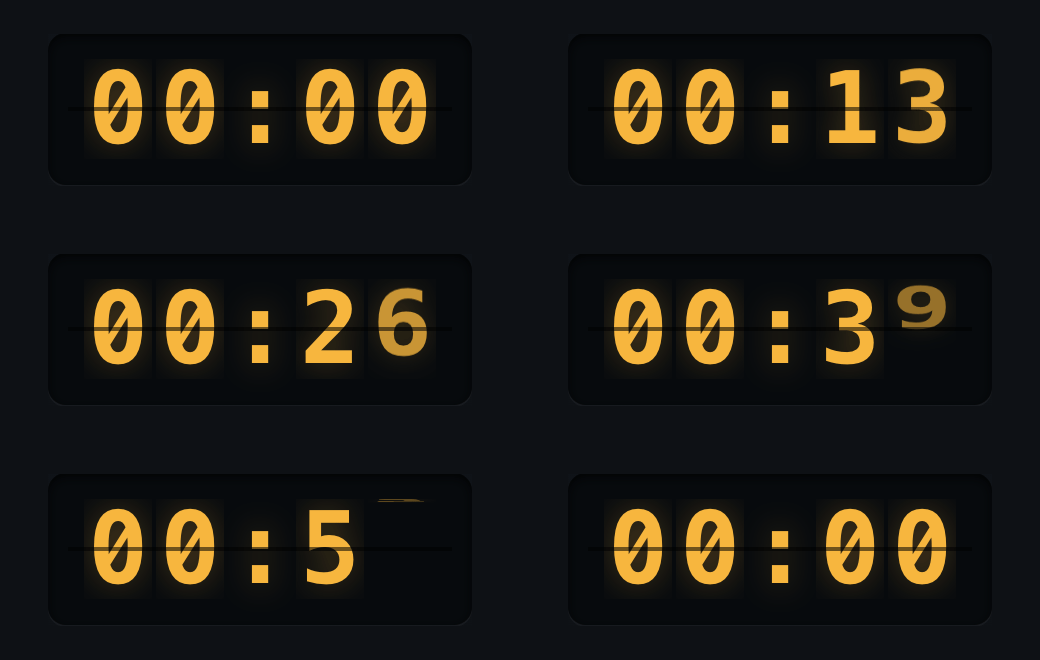
ui/index.html to match this picture. The first row is a key for you, the builder — it shows where each field goes. Don’t render it: the live dashboard shows real events only; the other rows are example data. Self-contained, no CDN, wall-screen sized. Poll /agenda.json every 30 seconds for events; each event is { start, end, title, location, calendar }, where start and end are ISO datetimes — the screenshot’s <start_time>, <end_time>, and <date> are values you derive from them, not separate keys. All-day events carry date-only start and end values, and end is the event’s last day, inclusive — the refresh crew already pulls back Google’s exclusive end date, so don’t subtract a day yourself. Date-only values must be treated as local: new Date("YYYY-MM-DD") parses as UTC and shifts a day early. Weather comes from /location.json ({"lat","lon","label"}; fetch open-meteo client-side, no key) and the countdown from /countdown.json — both blank until someone texts Domo to set them; a 404 just means not set yet.With the page in place (Domo is already running from Step 6), open http://127.0.0.1:8848 in a browser on the host. Your events are already there, written by Step 6’s automatic first refresh, and they re-sync every half hour, or on demand: text Domo “refresh the screen”. The weather and countdown cards start blank; text Domo (“set my weather to Oakland” or “add a countdown to the trip”) and they fill in.
0.0.0.0.Step 9: Sharp edges + uninstall
Read the edges once before you start.
| Edge | What to do |
|---|---|
| The channel flag is exact | Only --dangerously-load-development-channels server:domo loads the bridge as a channel; the plain --channels flag does not. run.sh already carries it; keep it if you tinker. |
reply is Domo’s only mouth | Ordinary assistant text reaches no one. If Domo goes quiet, the rule at the top of the folder’s CLAUDE.md is what reminds it — check that file survived. |
| Everything lives in the folder | Credentials, state, UI: one domo folder. Moving it breaks the mcp add registration (an absolute path) — re-run that line if you relocate it. |
| Signed in ≠ calendar-ready | The connector rides the claude.ai subscription sign-in. If Domo can’t see events at Step 6’s first text, fix the connector on claude.ai, not on the host. |
| The screen has one writer | agenda-publish.sh is the only thing that writes state/agenda.json; .claude/settings.json denies Domo’s own file tools on it. A stale agenda means the half-hour cycle is failing — an expired calendar login gets you one text from Domo; attach with ./run.sh and run /mcp to reconnect. |
| Every restart is a fresh conversation | By design: Domo’s job lives in CLAUDE.md, facts live on the calendar, so it doesn’t need chat memory. Don’t park anything important in the conversation. In the same spirit as the TODO(hardening) markers, continuity is an optional upgrade: save Claude’s session id and have run.sh resume it with --resume. |
| Every fresh start is hands-on, by design | The development-channel approval is expected at each fresh start (each start we validated asked again), so starting Domo is always yours: ./run.sh, approve, detach. An unattended auto-start (cron, systemd) would sit at the prompt — don’t add one. |
| Down means down | If Domo crashes or the machine reboots, it’s down until you start it again, and texts sent meanwhile are not delivered (the backfill TODO(hardening) marker is where that fix goes). |
| Dashboard has no login | It binds 127.0.0.1:8848 only. View it on the host or over an SSH tunnel; never rebind it. |
Uninstall
Deleting the folder removes your local copy of the Plow token. To also free Domo’s phone number, optionally delete the chat from the Plow Chat server first, while plow.json still holds the token that call needs — the Plow Chat API’s Clean up delete, reading both values straight from plow.json:
$ cd ~/domo && curl -sS -X DELETE "https://api.plow.co/v1/chats/$(jq -r .chat_uid plow.json)" \
     -H "authorization: Bearer $(jq -r .token plow.json)"
# 204 No Content → deleted.   404 → already gone or not yours.
Then stop Domo, unregister the bridge, and delete the folder:
$ tmux kill-session -t domo 2>/dev/null || true   # stops Domo, if it's running
$ claude mcp remove domo
$ rm -rf ~/domo   # or wherever your domo folder lives
$ rm -f ~/.plow-token   # leftover token file from activation, if still present
Left in place, harmless: Bun, Claude Code, and tmux.